
Know your equipment.
An AI assistant for ship crews, grounded in your vessel’s equipment and manuals.
Request a demo- X-BAND RADAR
- S-BAND RADAR
- ECDIS MASTER
- ECDIS BACKUP
- GYRO COMPASS
- GYRO COMPASS REPEATER
- ECHO SOUNDER
- VDR
- S-VDR
- GPS
- VHF DSC
- AIS
- AUTOPILOT
- NAVTEX
- SPEED LOG
- MF/HF RADIO
- SSAS
- EPIRB
- SART
- AIS SART
- INMARSAT C
- LRIT
- MAGNETIC COMPASS
- WIND SENSOR
- SATELLITE COMPASS
- VSAT
- STARLINK
- BNWAS
- GMDSS HAND VHF
A fault. A watch. No technician.
You don’t need to have seen this device before. The officer is right there, and so is its manual.
Not a service call. Not a phone call to the office. Not a search through a PDF.

The check plan.
Safe steps, in order. What is done is marked; what is left stays visible. Your words in, this radar’s manual out. Know your next step.
Another radar nearby. That is what the spokes are.
Left-click IR, choose level 3. A panel control, nothing opened.
Gone, fading, still there, cannot tell. One tap.
Cleared, and it says which page it read.


Every answer names its page.
This set’s manual, not general knowledge. Cited, so you can check the paper.
Every example on this site comes from MV Karadeniz, our demonstration vessel. It is not a real ship.

One page per set.
Make, model, serial, manuals, service history. Orvedis AI starts from there.

Hands full? Talk.
Hold to talk, eyes on the set. Your answer, spoken or typed, ticks the check.
Orvedis AI proposes; you answer. Anything that leaves the app, like sharing the service report, waits for your tap.
Discover Orvedis AI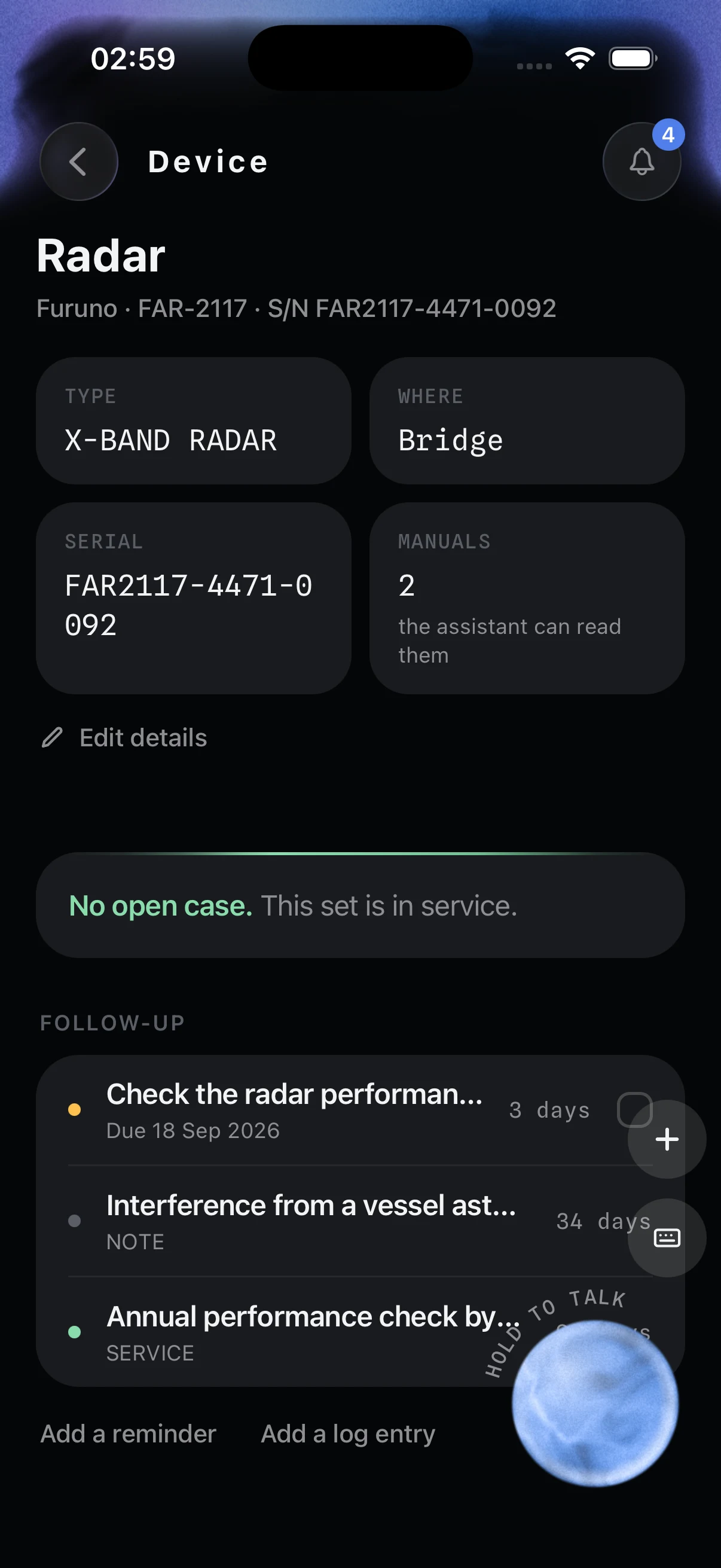
Languages
English first. Your crew’s language next.
English at launch. More languages are coming. Equipment vocabulary is never translated: the screen always matches the panel.
-
English
Press SELF-TEST and wait for the beep.
-
Turkish
SELF-TEST tuşuna basın ve bip sesini bekleyin.
-
Russian
Нажмите SELF-TEST и дождитесь сигнала.
-
Greek
Πατήστε SELF-TEST και περιμένετε τον ήχο.
-
Tagalog
Pindutin ang SELF-TEST at hintayin ang beep.
-
Ukrainian
Натисніть SELF-TEST і дочекайтеся сигналу.
-
Chinese
按 SELF-TEST,等待提示音。
-
Hindi
SELF-TEST दबाएँ और बीप का इंतज़ार करें।
-
Indonesian
Tekan SELF-TEST dan tunggu bunyi bip.
-
Romanian
Apăsați SELF-TEST și așteptați semnalul sonor.
-
Polish
Naciśnij SELF-TEST i poczekaj na sygnał.
-
Vietnamese
Nhấn SELF-TEST và chờ tiếng bíp.
-
Korean
SELF-TEST를 누르고 신호음을 기다리십시오.
Coming after launch
English Tagalog Russian Ukrainian Chinese Greek Hindi Indonesian Romanian Turkish Polish Croatian Vietnamese Korean Burmese Spanish Portuguese Italian
Not solved? The report is ready.
Seen, checked, still open. One PDF for the service company you already use.
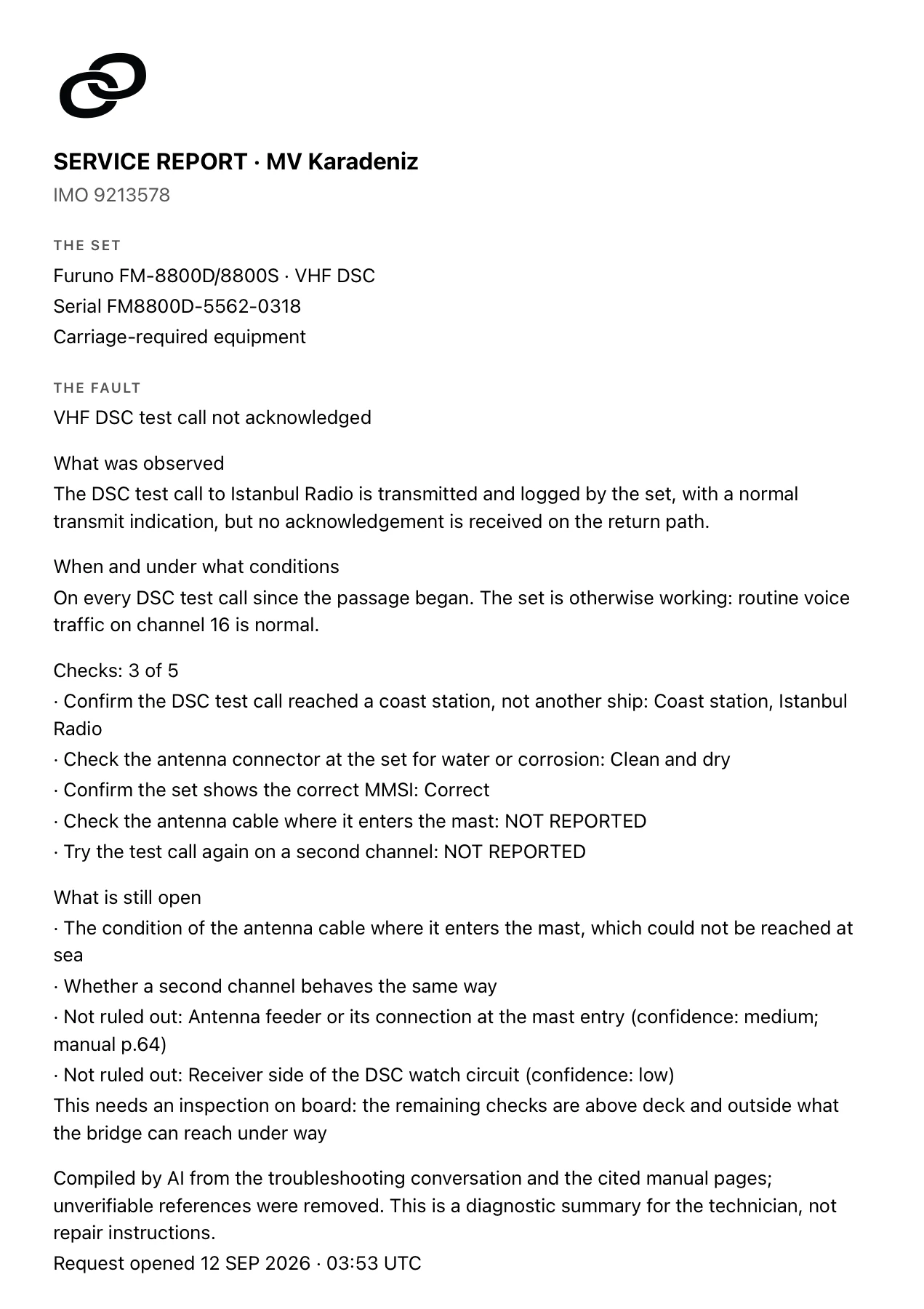
Compiled by AI from the conversation and the cited pages. A diagnostic summary for the technician. Not repair instructions.
Orvedis AI
Learn the set before it fails.
Lessons cut from the manual’s chapters, for the officer who just joined.
See lessonsHow it’s built
A line it will not cross.
Four rules, written in code, each locked by a test.
- The gate fails closed.
An unsafe step is removed. If the answer itself crosses the safety line, a fixed notice replaces it.
- Each rule is tested.
Each safety rule is numbered and locked by a test, and every test runs on every release.
- You stay in control.
Your answer, typed or spoken, ticks the check. Anything that leaves the app, like sharing the service report, waits for your tap.
- Only its manual.
It reads only the manuals attached to the set in front of you. Not the internet. Not another ship’s.
It explains and diagnoses. It never instructs work that belongs to a technician, in any mode: opening the case, high voltage, measuring, setup, alignment or calibration, soldering, internal parts, firmware, cleaning an antenna.
Discover Orvedis AINext step
See it on your equipment.
Every officer, whatever their experience, reaches the same safe next step. Your office stops being the help desk.
Thirty minutes, your equipment list, your questions.
Request a demoWe reply within one working day.
Apps for iOS and Android at launch, plus web sign-in for the company side: fleet managers and DPAs.